
For the online business owner whose whole business lives in fifteen different places
Open your laptop and everything you need is already there.
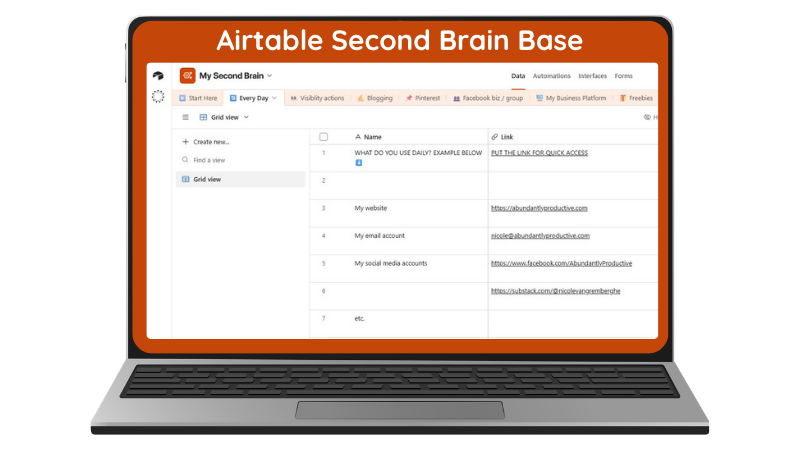
The Second Brain Base is a ready-made Airtable base with one place for every link, login, membership and resource in your business. Start with one tab if that’s all you have energy for.
Yes, I want everything in one place ($7) ↓I use this base to run my own business. If it doesn’t fit yours, there’s a refund.
Your business lives in more places than your head can hold
You have a login for your email, another for your website, a membership you paid for, a group you want to show up in, and an affiliate link saved somewhere. Some of it is in bookmarks, some is on sticky notes, and the rest is in your memory. So before you can write the post, send the email or answer the message, you go searching.
It isn’t because you’re disorganized. It’s because every link and login got added one at a time, wherever was closest, and nobody ever gave you one place to put them.
What it’s like to have one place
You open your laptop and your base is already open. The links you need are in tabs named for the part of your business they belong to. You start the day working, and the details you’ve been carrying around stop being your job to remember.
I built it for myself first
Before I had my base, I’d open my laptop and go on the hunt for all the links I needed to get going. Once I built it, most of my important resources lived in one place. Now when I need to write a blog post, for example, I go to the Blogging tab and everything I need to start is right there.
I had most of my important resources in the Second Brain Base. Then came the realization that I needed to create a tab for my affiliate links. This is why: I was at my desk one day, reading in a group where someone asked about a program. I’m a member of that program and I have an affiliate link for it, so I went to find it. By the time I had it, another woman was already in the comments with her link, and the person who asked used hers. I lost the sale.
I had the link. I just couldn’t get to it fast enough. So now my affiliate links have their own tab too.
The Second Brain Base is that setup, ready to copy
It’s my own setup, cleaned up so you can copy it into your Airtable, fill it with your own links and start using it right away. If you’ve used a spreadsheet, it’s like one, with a tab for each part of your business.
What you get
- You start working instead of searching. Each place you work has a tab with the links you need to begin.
- You find things in seconds. Type what you’re after in the search bar and it comes up.
- The details stop living in your head. Programs, memberships and prices sit in one list you can check.
- You can start small. Nothing is locked. Rename a tab, delete the ones you don’t use, and begin with just one tab.
What’s inside
Seventeen tabs, already set up and grouped by the part of your business they belong to:
- Start Here and Every Day. Start Here explains the base in more detail. Every Day holds the things you open daily, like your website, email and social accounts, so your day begins in one place.
- Blogging, Pinterest, Facebook business and group, YouTube, Email Marketing, and Visibility Actions. A tab for each place you show up, with your links, notes and the groups you post in, so posting takes one click.
- Products, Freebies and Affiliates. Product names, images, prices and sales pages, and for each affiliate program your link, the price and your commission, so a question about a product doesn’t send you digging.
- Main Coaching Program, Important Membership, Other Memberships and Other Resources. Everything you’ve signed up for, with where to log in.
- My Business Platform. An overview with the most important links for your own business, like WordPress, your mailing platform or your shop.
- Personal Brain. Links to personal programs and websites you want handy during the workday.
How it works: Click “Copy base” and it lands in your own Airtable account. Anything you change stays in your copy and never touches mine. Prices can be switched to your own currency.
My own links are in there as working examples, so you can see it filled in. A few are affiliate links, and I earn a small commission if you join through them. Swap them for yours.
What it costs
The base is $7. That lost affiliate commission was about $16, if I remember correctly, which is more than twice the price of this base. One catch like that and it has paid for itself.
Yours might cost you something quieter than a sale: half an hour of searching before you can start, or a reply that goes out late because you couldn’t find the details.
What I can and can’t show you
I don’t have a wall of reviews for this base yet, and I won’t make one up. What I have is this: I built it for myself, I open it every day, and everything in it came from running my own business.
But what if…
I don’t have time to set up a new system?
This isn’t a system you build. It’s already built. You open it, add your links and documents, and you’re using it the same day.
I’ve tried organizing tools before and they never stuck?
Most of those asked you to keep up with them. This one just holds what you already have. Nothing to maintain, just a place to put things so you can find them again.
I’m overwhelmed quickly and learning new software is complicated?
Airtable looks and works like a spreadsheet you already know how to use. If you can fill in a table, you can use this base. If you get stuck, email me at [email protected].
I don’t know where to start?
It has a lot of tabs because a business has a lot of parts. Open Start Here first, delete the tabs that don’t apply, like Blogging if you don’t blog, and begin with just one tab, for example Every Day with the links you use most.
I can’t afford another tool. Do I have to pay for Airtable?
No. The free plan is enough. It’s what I use myself.
I want to keep my passwords in it?
Airtable doesn’t encourage storing passwords, and there are other platforms built for that, so I don’t keep them in my base. The base holds your links and notes, like the link to your email account.
My business is nothing like yours?
You can rename, duplicate or delete any tab and add your own fields to make it fit your business.
Try it for 14 days
Email me at [email protected] before you give up. If it doesn’t fit, I’ll help. If it still doesn’t fit, then I’ll refund you.
Who made this

I’m Nicole. I help women solopreneurs, like you, with gentle productivity and Airtable systems. I’ve used Airtable since early 2020, and I built and used this base for myself before I decided to share it. You can find more Airtable templates at The Airtable Toolbox.
Ready to run your business from one page?
The next time you need a link, it’s already there.
Yes, I want everything in one place ($7) ↓$7, and a refund within 14 days if it doesn’t fit.
Yes, I want everything in one place
We use your information to process your order and provide your purchase. See our Privacy Policy for details.
